A simple process ensures your family receives the information they need, when they need it, without compromising your privacy today.
How It Works
You set up your vault once. SafeHerit handles the rest.
Setup
Create Your Vault
Generate your private encryption key. Only you hold it.
Add Beneficiaries
Define who will receive information and record messages for each.
Add Validators
Choose trusted people who can confirm your status. (Optional)
Set Up Verification
Set how often SafeHerit checks on you.
Ongoing
Record Your Assets
Generate your private encryption key. Only you hold it.
The Pulse Check
You confirm you are active. SafeHerit waits.
Information Released
When the time comes, each beneficiary receives their assigned information.
1
Create Your Account
Generate and Register Your Key
Start by creating your account with your email address. During setup, SafeHerit generates a unique private encryption key on your device. This key is yours alone. It never leaves your device, and we never see it.
You will download this key as a secure file. Store it somewhere safe, such as a password manager or a secure backup location. You will need it each time you access your vault.
Why This Matters
Your private key is what makes SafeHerit different. Everything you store is encrypted using your key before it reaches our servers. Without your key, your data is unreadable, even to us.
A beneficiary is anyone you want to receive information about your assets: a spouse, a child, a business partner, a trusted friend. You decide who they are and what they will receive.
For each beneficiary, you provide their name and contact information. SafeHerit generates a unique private key for each one, which you download and share with them directly. This key allows them to decrypt only the information you assign to them.
Personal Video Messages
Beyond asset information, you can record a personal video farewell message for each beneficiary. These videos are encrypted and delivered alongside their assigned information when the time comes.
You hold the keys. SafeHerit does not store beneficiary private keys. It is your responsibility to share each key with the appropriate person.
3
Add Validators
Optional
An Additional Layer of Verification
Validators are trusted individuals who can confirm your status if SafeHerit is unable to reach you. They have no access to any information about your assets or beneficiaries. Their sole role is to answer one question: is the account holder still active?
You might choose a close friend, a family member who is not a beneficiary, a colleague, or a professional contact. The choice is yours.
How Validators Are Used
If you do not respond to SafeHerit’s check-ins, the escalation process begins by contacting your validators. This adds a human verification layer before any information is released.
No access to your data
Cannot see assets or beneficiary information
You control who and how many
Add one, several, or none at all
4
Set Up Verification
How SafeHerit Checks On You
SafeHerit uses a system called Pulse Check to periodically verify that you are still active. You choose how often these check-ins occur: monthly, bi-monthly (every 60 days), quarterly, or a custom interval.
When a Pulse Check is triggered, SafeHerit contacts you by email. If you have registered a phone number, SMS is used as an additional channel. You simply confirm that you are active. If you respond, nothing happens. Your vault remains locked, and your information stays private.
What Happens If You Do Not Respond
If you miss a check-in, SafeHerit follows a defined escalation process. This includes additional contact attempts and, if you have added validators, reaching out to them for confirmation. Only after all verification steps are completed does the release process begin.
You can update your Pulse Check frequency at any time.
5
Record Your Assets
Document What Matters
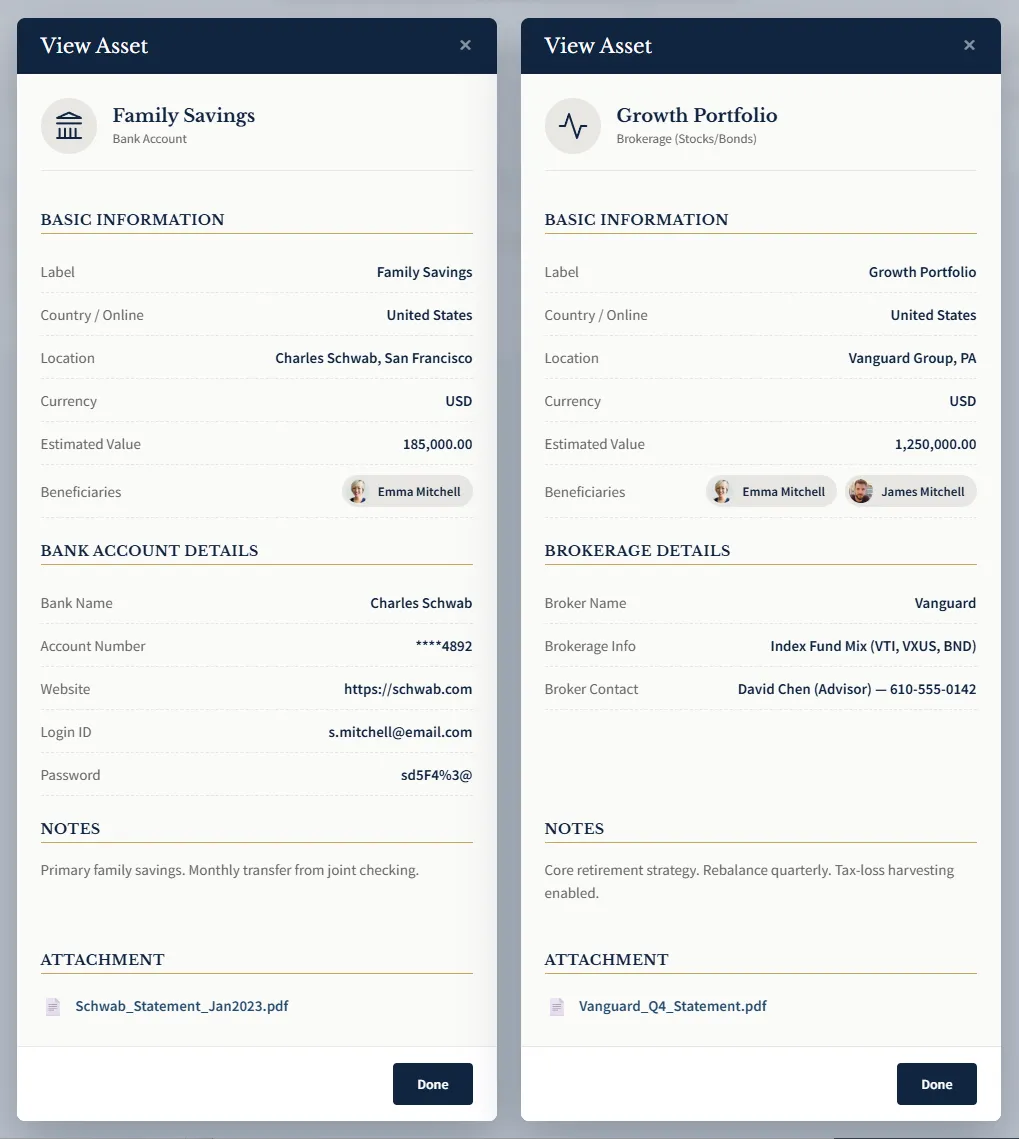
With your beneficiaries in place, you can now record the information each one needs to know. SafeHerit is designed to store information about your assets, not the assets themselves. This includes account details, locations, access instructions, and anything else your beneficiaries would need to locate and manage what you leave behind.
For each asset, you assign one or more beneficiaries. When the time comes, each person receives only the information you have specifically assigned to them.
What You Can Record
SafeHerit supports a wide range of asset types: bank and investment accounts, real estate, insurance policies, business interests, cryptocurrency holdings, digital accounts, physical valuables, and more. You can add as many assets as you need and update them at any time.
Every asset you record is encrypted using your private key before it leaves your device. SafeHerit cannot read your asset information.
Click or tap to enlarge image
6
The Pulse Check
Click or tap to enlarge image
Confirm You Are Active
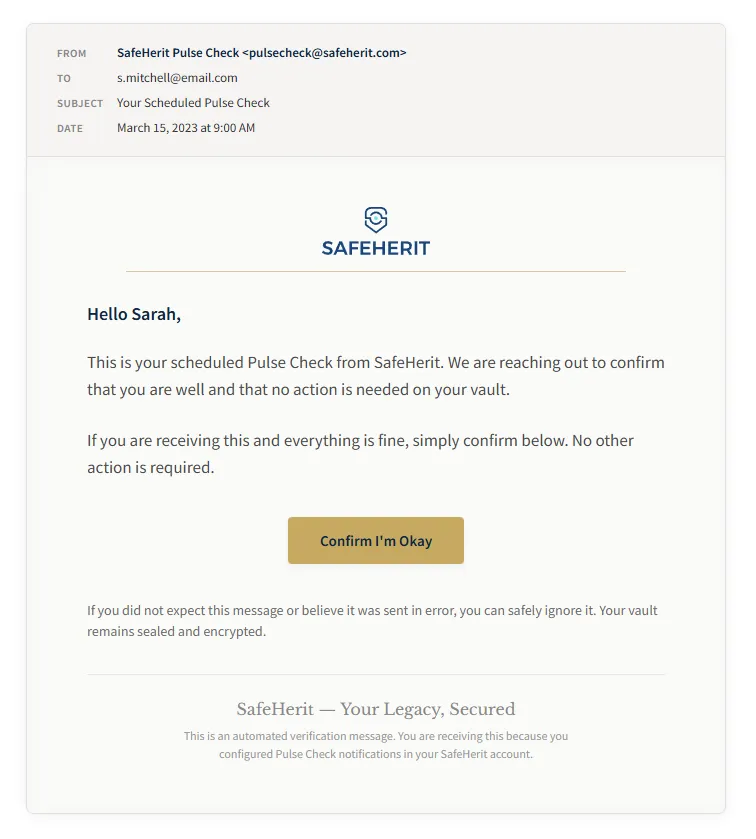
Once your vault is set up, SafeHerit periodically reaches out to confirm you are still active. At the interval you selected, you receive a Pulse Check: a message asking you to confirm your status.
Responding takes seconds. A single click or tap confirms you are active, and SafeHerit resets the timer until your next check-in. Your vault remains locked, and nothing changes.
If You Do Not Respond
Life happens. If you miss a check-in, SafeHerit does not immediately release your information. Instead, it follows the escalation process: additional contact attempts through your registered channels, and if you have added validators, outreach to them for confirmation. Only after all steps are completed does the release process begin.
Low friction
Responding takes just a few seconds
Multiple safeguards
Retries and validator confirmation before release
Adjustable anytime
Change your check-in frequency whenever needed
7
When the Time Comes
A Careful Process
If you do not respond to a Pulse Check and the escalation process confirms you are no longer active, SafeHerit begins the release. Your beneficiaries receive only what you assigned to them, protected until the moment they need it.
1
Beneficiaries are notified
Each beneficiary receives a notification informing them that information has been prepared for them.
2
They use their key
Using the private key you shared with them, each beneficiary decrypts only the assets you assigned to them.
3
Information is revealed
They see the asset details, access instructions, and any personal video message you recorded.
No searching through paperwork. No guessing where to look. No critical information lost forever. The people you care about receive exactly what they need to move forward, because you took the time to prepare it for them.
“My father passed away five years ago and we are still digging to find accounts. A small pension here, an old insurance policy there. I swore I would never put my kids through that. SafeHerit made it easy to record everything in one afternoon.”
— Maria K., Consultant
“I spent weeks researching before I trusted SafeHerit with this information. The zero-knowledge encryption is real. My data is encrypted before it leaves my laptop. Even if they were hacked, there is nothing to steal. That is the standard I needed.”
— David W., Crypto Investor
“I have bank accounts in three countries, a rental property overseas, and crypto in two different wallets. My wife knew about maybe half of it. SafeHerit let me put everything in one place so she will never have to guess what exists or how to access it.”
— James L., Expat
“I have a will. I have a trust. But neither of those documents tells my family the password to my email or the location of my crypto seed phrase. SafeHerit fills the gap that traditional estate planning misses.”
— Robert K., Lawyer
Protect What Matters Most
Setup takes under 10 minutes. Your family’s peace of mind lasts a lifetime.